The previous article focused on Application Deployment and Hosting, taking the user behind the scenes of the technologies that power GradGlance
This article, the last of the series, will focus on GradGlance Application Logging & Analytics.
Transitioning from active development to operations mode came with a mix of feelings. First was pride. Pride in the work that had been done to get to this point. Pride in the hours of hard work and care that enabled the service to brave the realities of serverland and deliver value to users around the world. Right next to the feeling of pride was that of anxiety because of the many ways things could break.
And boy, did things break! And when they did, I needed to be prepared. Exactness is currency in software engineering and I wanted to know what happened when and where during GradGlance operations. I quickly realized that I needed a file of truth. I needed a file of logs.
Application Logging
Logging is vital to the smooth operation of any software system. Done properly, it helps to cut ambiguity during troubleshooting, enhances accountability, and improves system efficiency. Fortunately, Python ships with a native logging module which was fairly easy to configure.
Logs were generated when specific events occurred in the application such as when a user subscribed; when a user unsubscribed; after daily emails were sent; after sanitized data was successfully inserted into the DB; and after the database cleanup script was run. With logs, abundance was more beneficial than scarcity. Therefore if a system event made logical sense to log, rest assured that it was logged. I logged error messages too; and attempts at duplicate user subscription. To log is to preserve the truth of the system as it happened in real-time. It pleases me to report that I enforced this practice with singular discipline.
These logs were placed at strategic points in the application and fed into a central log file that resides exclusively on the local server.
2024-12-09 08:57:01,900 INFO Accessing scraper.py file
2024-12-09 08:57:01,900 INFO Accessing mongo.py file
2024-12-09 08:57:02,613 INFO MongoDB Connected!
2024-12-09 08:57:08,986 INFO 82 posts and items zipped successfully
2024-12-09 08:57:14,208 INFO batch_id for inserted batch post : 1733734634
2024-12-09 08:57:14,320 INFO Posts inserted into collection
2024-12-09 09:00:01,295 INFO Accessing main.py file
2024-12-09 09:00:01,966 INFO MongoDB Connected!
Sample logs after system events
I strived to leave nothing important to speculation so that when things broke, as they often did, I could access an abundance of data to troubleshoot from.
Remote Logs
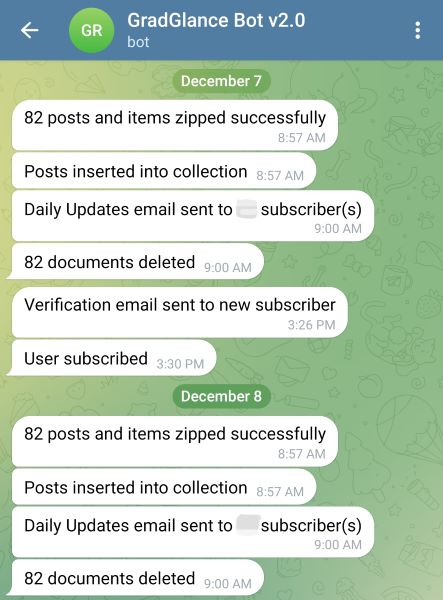
At 9 AM London time when emails are sent every morning, life does not afford me the luxury of monitoring logs on the Raspberry Pi. So I needed a practical way to know in real time if daily emails had been sent successfully. To solve this, I configured a GradGlance Telegram bot to send strategic logs to my mobile device as they occurred.
 GradGlance Telegram Bot
I configured remote logs for critical system events such as:
- When a user subscribed
- When a user unsubscribed
- After data is inserted into the database
- After emails have been sent to subscribers
- After the cleanup script has run
These remote logs reveal no personally identifiable information and only exist to confirm that GradGlance continues to live up to its daily mandate. It always feels nice, being somewhere else, and getting real-time updates by the bot that all’s good back at the base. I am content with the knowledge that GradGlance is out there standing on its own and delivering value to the world. This must be what being a parent feels like, but I digress.
Log Saver, Life Saver
Once, I was notified by a user that daily emails arrived about an hour late. I had observed this issue earlier from the bot notifications but assumed it was due to a synchronization lag from Telegram. I also had not made any changes to the application code in days, which strengthened my resolve to heap the blame on the messaging service. It took another user complaint to compel me to give this issue the seriousness it deserved.
To understand the issue, I went to the only place of truth in the application - the log file - and analyzed the logs. I realised that it now took 2 minutes to send a daily email to a single subscriber. For context, this action used to take less than 1 second just the day before. To get a sense of the problem, the email delivery function that completed in less than 1 minute for all subscribers now took 2 hours, effectively making the email delivery function 120 times slower and threatening the reliability that subscribers have come to expect from GradGlance.
Loops? Why not BCC?
I resorted to looping through the subscriber list one after the other because the Python Email Server does not support the Blind Carbon Copy (BCC) feature. The alternative was to send a bulk email that exposed subscriber email information. This was at best a breach of trust and at worst a potential security issue. So I figured to cycle through the list of subscribers, generate a separate email, and distribute to users. Although I would later leverage this looping solution when I rolled out a feature to add unique unsubscribe links to the daily subscriber emails, this solution was first borne out of the need to protect subscriber email information.
The Fix
I gleaned from the logs that the send_email function was responsible for the delivery lag. In the function, I realized that the service was authenticating into the Gmail server for every iteration of the loop. I guess the service hit a limit and Gmail began to throttle the connection accordingly. After researching in futility on how to fix the issue on the Gmail end, I looked inward and sought to fix the code. I did this by moving the authentication logic outside of the loop to just before the loop began, ensuring that I only logged in one time and sent the daily emails to subscribers using the active authenticated session. This fixed the issue for good.
I had experienced first-hand how logs provided insight at every step of the way from issue discovery to troubleshooting to debugging. This is your cue to invest in logging where possible for logging is the truth and, like the truth, it shall set you free!
Application Analytics
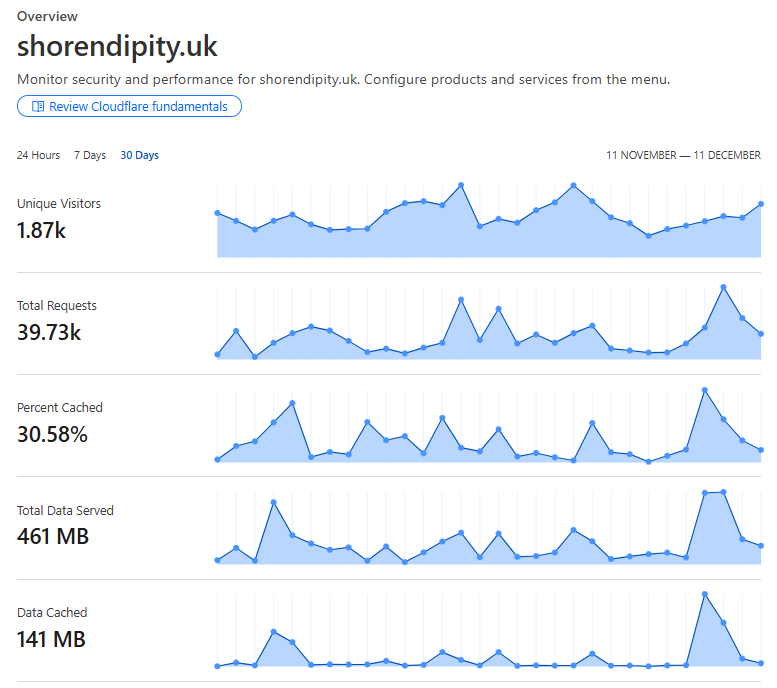
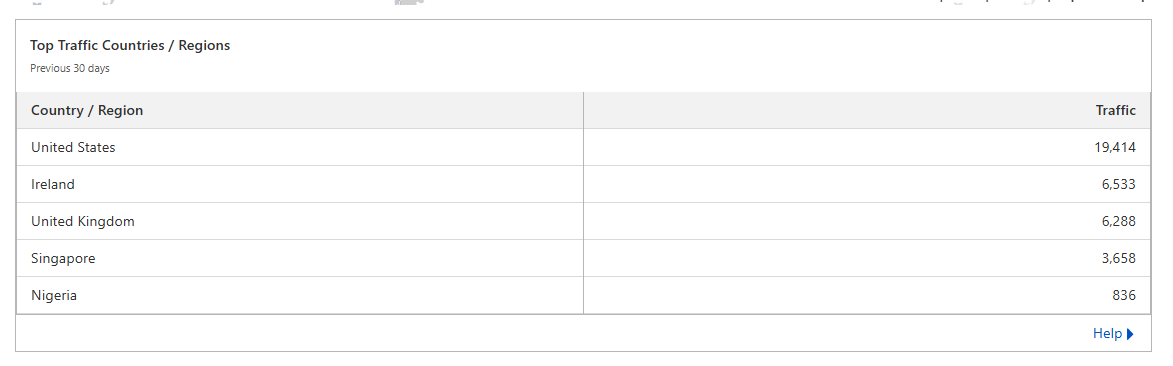
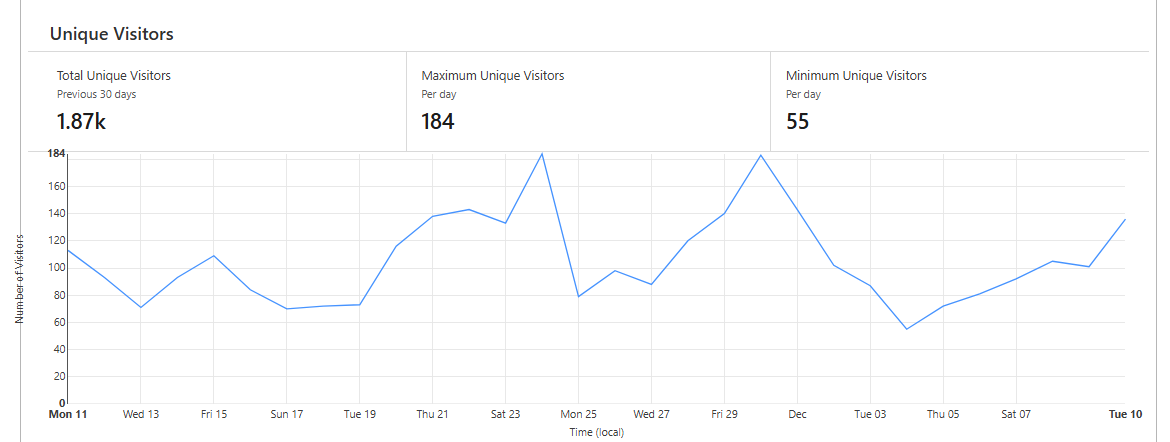
Using Cloudflare services such as DNS & Cloudflare Tunnels comes with the benefits of improved system security, Distributed Denial of Service (DDoS) protection. Another benefit of using these services is the analytics services Cloudflare provides as a result. Logging into the Cloudflare dashboard reveals metrics such as security analytics, DNS query analysis and web traffic analytics.
*Please note that Cloudflare does not differentiate traffic by subdomains. The metrics shown below are aggregated for all the sites, including GradGlance, hosted on shorendipity.uk domain.
 Analytics Overview (Nov 11 - Dec 11)
 Site traffic by country (Nov 11 - Dec 11)
 Unique visitor analytics (Nov 11 - Dec 11)
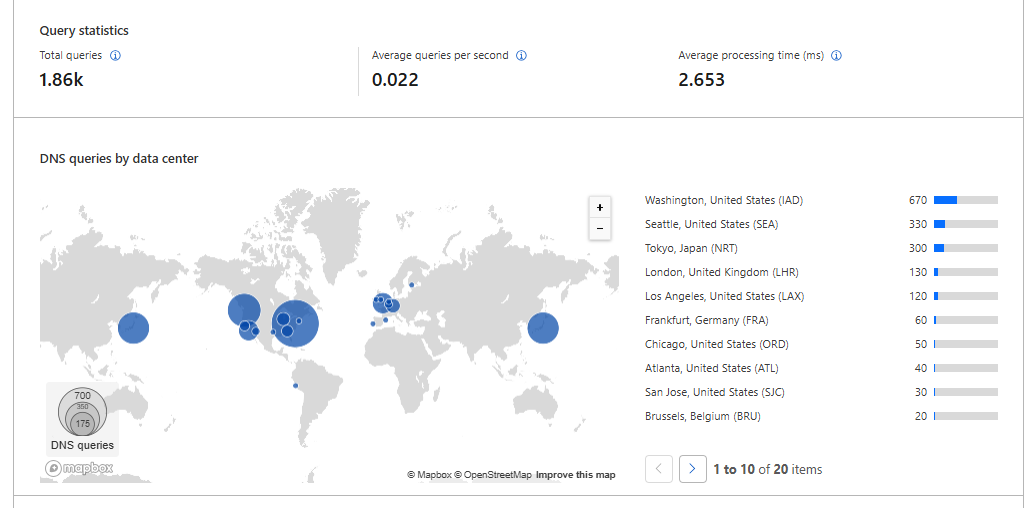 DNS Requests by Data Center Location (Nov 11 - Dec 11)
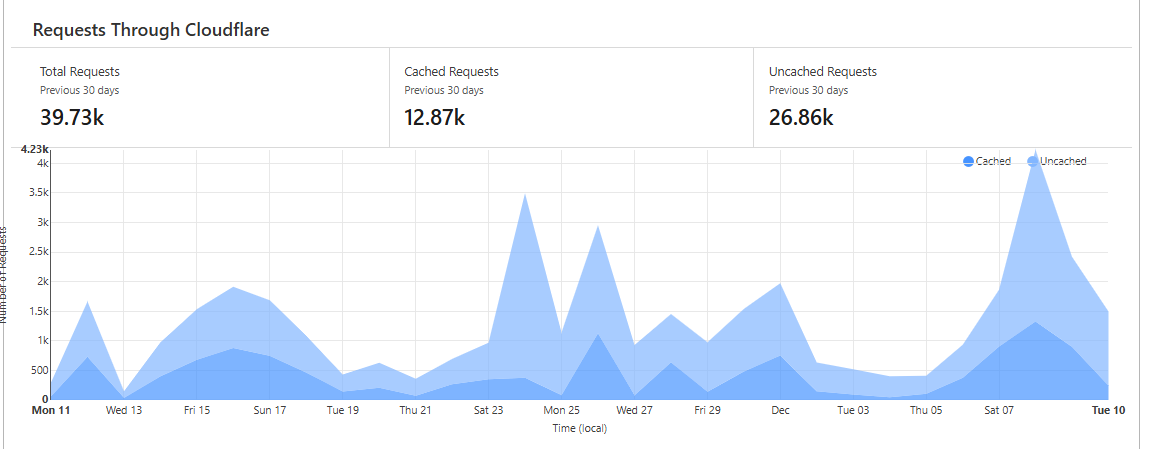 Cloudflare Requests showing caching proportion (Nov 11 - Dec 11)
Cloudflare provides generous insight into network connections, site visits and metrics that helps to communicate the state of the application at any given time. These metrics are available out of the box to the user at no cost. A truly fantastic service!
Final Thoughts
As you start to walk on the way, the way appears.
-Rumi
GradGlance was meant to be a humble python script that ran on a daily schedule out of a server. The project scope turned global only after I dared to start. Not before. As I began, and with every change, with every discomfort, with every bug fix, I grew and got better and I knew.
Make no mistake, this was hard work that demanded a lot of time in a year that asked for a different set of priorities. But I would not change a thing about how it all came together. Beyond building something of value for my people and for the world, this was personal, and for reasons I will not get into, this was redemption!
I had fun building GradGlance, loved writing about GradGlance, looked forward to talking to people about how I built GradGlance; and importantly, admired the person I became in the process of building GradGlance. This experience taught me a lot about doing things afraid, showing up for as long as is required, and looking your fears dead in the eye.
To build GradGlance was to learn first-hand what was possible when life handed a lad a Linux server to call his own. There is still so much to learn, so much to build and it pleases me to inform the reader that this lad is just getting started!
Thanks for reading ☺️.