The previous article focused on GradGlance Systems and Interface Design, helping the reader appreciate some of the engineering and design decisions I made while building the service.
This article will discuss GradGlance Application Deployment & Hosting
Introduction
I enjoyed writing this one. Not because I had more things to say; or because my favourite piano playlist was on repeat as I stitched this article together; but because writing made me reflect on how much I dreaded deployments before building GradGlance and how so much has changed since. To have come to the point where I can now articulate how I made it all happen, on a server I own, having overcome my fears one Linux concept at a time, fills me with an understandable sense of accomplishment - a serious testament to how far I have come indeed.
Daily Operations
Sending daily emails of job post changes to subscribers is the principal objective of GradGlance. So I figured the best way to begin this article is to answer the question: What constitutes a GradGlance Daily Operation?
Every morning at 8:57 AM London time, a script is triggered to complete the following operations:
1. Get current job data from The Student Room (TSR)
2. Sanitize the data
3. Store the data in the database
At 9:00 AM London time, another script is triggered to do the following:
1. Get the previous day's data
2. Get the present day's data
3. Compare the present day with the previous day's data to obtain changed elements in the data
4. Send an email of the changes to subscribers.
GradGlance continues to deliver on this crucial mandate, as the growing list of subscribers can confirm ☺️. But getting to this point came with a fair bit of challenges.
Platform Challenges
After developing the core functionality of the service on a Windows PC, I decided to continue application development and eventual deployment on a Raspberry Pi (RPi) I had been looking to put into use for months. I obtained the device to provide a safe and inexpensive sandbox to get familiar with the Linux Operating System. By this logic, moving the app to the Raspberry Pi, a Linux server, made perfect sense.
I migrated the application code to the Raspberry Pi and attempted to install software dependencies when I hit a wall. Things were not working. A bunch of software binaries were incompatible with the RPi. Compatibility is a detail many take for granted while developing software on mainstream operating systems like Windows or Mac. On this side of the fence, however, life was real, painful and cruel.
I would quickly find that these errors stemmed from certain software not being compatible with the ARM CPU Architecture and the Debian Linux Distribution that the RPi is built on. My options involved switching the RPi Linux distribution from Debian to Ubuntu, which had better support for the binaries I needed for the service; ditching the Raspberry Pi altogether; or innovating around the problem one binary at a time. It should come as no surprise to the reader which solution I eventually opted for 😑.
Problematic Software Binaries
Below is a list of some problematic binaries and their workarounds
| Binary | Description | Solution |
|---|---|---|
| MongoDB | Current version was incompatible with the RPi. MongoDB actively discouraged using older versions of the software | Migrated to MongoDB Atlas Cloud-based service |
| Google Chrome | Browser used by Selenium for its scraping service was not available on the Raspberry Pi | Leveraged a Chromium alternative that worked after some tinkering |
| Fernet | Strange error while importing the library used by the backend for symmetric encryption | Used an alternative PyNacl library |
Took a bit of research and consulting with colleagues but I got the code to finally run on the RPi. With these problems out of the way, I continued to develop directly on the RPi with little difficulty.
Application Deployment
After building out the client and server sides of GradGlance, the time had come to ship the application code from a local directory to its final resting place on the server.
Frontend Deployment
I ran an npm build command to build and minify the React code into a tidy index.html file. This HTML file was consequently copied to the Raspberry Pi’s /var/www/ directory. In addition, I configured nginx’s sites-available file with settings for the service.
server {
    listen       5555;
    listen  [::]:5555;

    location / {
        root   //var/www/gradglance.shorendipity.uk;
        try_files $uri $uri/ /index.html;
    }
}
Sample Nginx server configuration
Pleased with the results, I wrote a deployment script to automate the build and copy steps from the local build directory to the /var/www/ directory on the server.
#!/bin/bash

echo "Switching to branch main"

git checkout main

echo "Building app ..."
npm run build

echo "Deploying files to server..."
scp -r dist/* /var/www/gradglance.shorendipity.uk

echo "DONE!"
Frontend deployment script
Backend Deployment
Python’s FastAPI ships with a Uvicorn server that can handle requests out of the box with little configuration. Only problem was that the Raspberry Pi would shut down the API service after an extended period of user inactivity. Solving this problem was vital because the API, by design, would be “idle” most of the time as it “listened” for user requests; and having the server confuse “listening” for inactivity was bad news for the reliability of GradGlance.
[Unit]
Description=GradGlance FastAPI Uvicorn server
After=multi-user.target

[Service]
Type=simple
User=ajibolashodipo
ExecStart=/home/ajibolashodipo/hosted_services/.venv/bin/python /home/ajibolashodipo/hosted_services/forum_monitor/forum-monitor/api.py
Restart=always

[Install]
WantedBy=multi-user.target
Systemd GradGlance service configuration
I fixed this by adding the API service configuration to the systemd list of background processes. This ensures that the service stays on even in periods of inactivity, as well as guaranteeing the automatic start of the API service when the system restarts.
 forum-monitor-server.service - GradGlance FastAPI Uvicorn server
     Loaded: loaded (/etc/systemd/system/forum-monitor-server.service; enabled; preset: enabled)
     Active: active (running) since Sun 2024-11-24 11:48:57 GMT; 1 week 5 days ago
   Main PID: 25870 (python)
      Tasks: 1 (limit: 4915)
        CPU: 16min 57.548s
     CGroup: /system.slice/forum-monitor-server.service
             └─25870 /home/ajibolashodipo/hosted_services/.venv/bin/python /home/ajibolashodipo/hosted_services/forum_monitor/forum-monitor/api.py
Systemd GradGlance service status
Cron
Cron is a utility that helps to run software on a schedule. GradGlance leverages Cron to schedule the scripts that fetch, sanitize, distribute posts to users every day without fail. Schedules are configured via the Crontab (see below)
57 8 * * * /home/ajibolashodipo/hosted_services/.venv/bin/python /home/ajibolashodipo/hosted_services/forum_monitor/forum-monitor/data/mongo.py
0 9 * * * /home/ajibolashodipo/hosted_services/.venv/bin/python /home/ajibolashodipo/hosted_services/forum_monitor/forum-monitor/data/main.py
Cron configuration
Specifically, the first line of the above configuration triggers the mongo.py script at 8:57 AM London time to fetch, sanitize, and insert job data into the database. The second line runs the main.py controller file at 9:00 AM London time to compare the present day with previous day’s data and send emails to subscribers.
Application Hosting
Having designed, developed and deployed GradGlance, it was time to share this service with the world. Conventional internet advice revolved around port forwarding – opening a port on an internet router to accept user requests. This was a practical solution but one that was fraught with digital dangers. Bad actors on the internet could get a hold of the server’s IP address and port and potentially breach the server for their nefarious purposes.
Ways exist to improve the security of a server such as configuring network firewalls, intrusion detection & monitoring, and network encryption. Sadly, I was unable to tinker with these sophisticated security methods for the simple fact that I could not open a port on the internet router– which was the first step of the process. I suspect the internet service provider had something to do with this security restriction but I was not interested in contacting them to find out. I needed another solution fast. And I soon found one.
Cloudflare Tunnels
Cloudflare Tunnels provide a means to connect services to the internet without exposing your server’s IP address. Cloudflare achieves this by running a software daemon called cloudflared on the origin server (the Raspberry Pi in this case). cloudflared sits between a Cloudflare edge server and the internal service running on your origin server. The cloudflared daemon creates a secure tunnel from the origin server to Cloudflare’s edge servers, and funnels an incoming request from the edge server to its destination within the origin server.To fully utilize Cloudflare’s secure tunneling and associated services, I made Cloudflare the authoritative DNS provider for GradGlance.
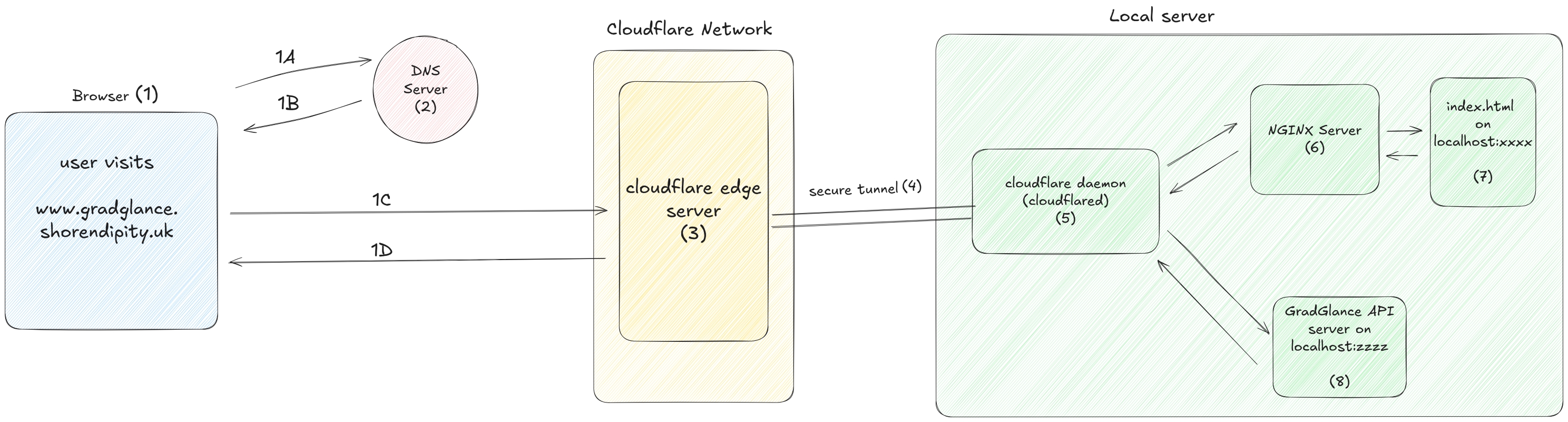 Simplified Hosting Architecture
When a user visits GradGlance on their browser (1A), a request is sent to the DNS server (2) to obtain the website’s IP address. The DNS would typically resolve (1B) to the IP address of the origin server hosting the website, exposing said server to potential security attacks. But because the cloudflared daemon on the origin server (the Raspberry Pi) is authenticated to Cloudflare, the DNS request returns the address of the associated Cloudflare edge server and not the origin server’s, completely masking the identity of the Raspberry Pi and greatly improving security in the process. As even the most capable bad actors cannot attack what they cannot locate, the Raspberry Pi server gets to fulfil user requests without fear of discovery on the internet.
Having obtained the edge server’s IP address from DNS, The browser then makes a request (1C) to the edge server . From the edge server (3), the request goes through a secure tunnel (4) to the cloudflared (5) software installed on the Raspberry Pi. The request is consequently sent to an Nginx server (6) which returns the static index.html webpage (7) back to the user (1D). Similarly, requests to the GradGlance API also go through the secure tunnel, intercepted by cloudflared, and sent to the API server (8) running on the Raspberry Pi.
Leveraging this hosting architecture enabled hosting GradGlance without needing to forward a port on the internet router, greatly improving the security of the service. The best part is that Cloudflare allows users to take advantage of this solution at no cost. A fantastic service. What’s not to love ?!
Up Next
This article discussed application deployment and hosting, highlighting technologies, challenges and solutions that made GradGlance globally accessible.
Deployment can feel like grunt work sometimes. But its impact on the ability of software to scale is undeniably critical. It is hoped that the reader leaves this article with a better understanding of the infrastructure that enable software services such as GradGlance deliver on their core mandate.
Having discussed the Application Deployment and Hosting, the next article will focus on Application Logging and Analytics.
Thanks for reading ☺️